
Supported ArcGIS Enterprise platformThe upgrade returns ArcGIS Enterprise to a supported position, with the resulting platform validated for continued operation.
UPGRADE
ArcGIS Enterprise Upgrades -
change should be planned to be boring
Geoworx approaches production ArcGIS Enterprise upgrades by understanding the environment first, identifying dependencies, establishing a recovery position, making the change in a controlled sequence, proving the platform works and returning it cleanly to operation.
The version change is only one part of the work. Production upgrades are undertaken out-of-hours, typically over a weekend, with the platform returned to service before Monday morning. Your business should hardly notice the impact.

An upgrade is more than -
installing a new version
ArcGIS Enterprise sits inside a wider technology environment.
Identity, certificates, DNS, networking, security controls, operating systems, databases, integrations, scheduled processes and other dependencies can all affect what happens during an upgrade.
Geoworx works with the people responsible for those parts of the environment so that responsibilities are understood before the maintenance window begins.
The objective is to leave behind a supported, recoverable and understandable ArcGIS Enterprise platform.
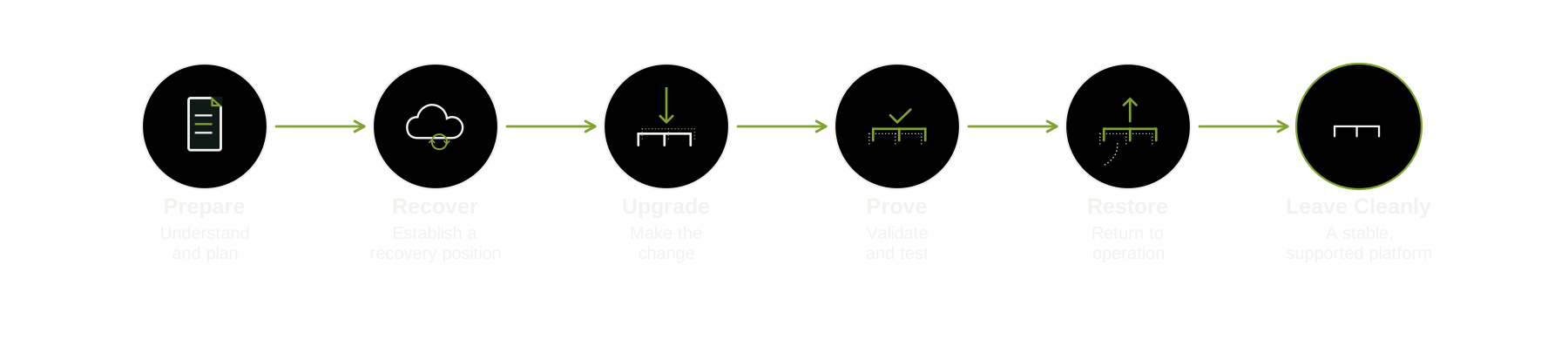
A controlled upgrade process
A structured path from preparation and recovery through change, validation and return to operation.
ArcGIS Enterprise upgrades do not need to be disruptive
A healthy, well-built GIS platform can benefit from a regular, systematic upgrade process - keeping the environment current while making each individual change more manageable.
Geoworx completes many ArcGIS Enterprise upgrades each year. Repeating the work across different environments means the process is continually learned from and refined - helping reduce risk and minimise downtime.

PREPARE
Expertise means being prepared, not infallible
Complex production environments sometimes behave differently from expectation.
Environments originally built by Geoworx usually require less discovery because the architecture and its dependencies are already understood. When Geoworx is adopting an existing environment, a platform health check is recommended first. This establishes the current architecture, dependencies and known issues before the upgrade window begins.
A planned recovery position, knowledge of the architecture and a controlled upgrade process mean that an unexpected result can be investigated without immediately turning the situation into a crisis. The target release, the supported upgrade path and relevant platform dependencies are confirmed before the outage window is planned.
Geoworx does not define a successful upgrade as one in which nothing unexpected happened. It is one in which change remained controlled.

RECOVER
A recovery position is established before change begins
Geoworx uses several complementary methods to establish an appropriate recovery position. Before the upgrade, you will typically be asked to:
✔ Ensure Geoworx has the required access to your IT environment
✔ Pause ETL and scheduled processes to establish a known, testable data position
✔ Agree any temporary anti-virus or endpoint-security changes required for the upgrade
✔ Take an appropriate infrastructure snapshot or backup
At the agreed outage-window start time, Geoworx will:
✔ Take ArcGIS Enterprise component-level configuration backups, providing a more granular recovery option
✔ Confirm the current health of the environment against the expected baseline
✔ Record any observed issues that could affect the upgrade or require later attention
✔ Confirm readiness before the first upgrade operation begins
UPGRADE
Good upgrade work is deliberately uneventful
Preparation has happened. Responsibilities are known. Access has been checked. Recovery exists. Installation media and licences are available.
The professional achievement is not heroically recovering from chaos. It is arranging the work so that heroics are unlikely to be required.
During the upgrade window, software is applied, licensed and fully patched. Security settings are reviewed and tightened where appropriate. Every step is recorded, with decisions and observations documented as the work progresses. Where a particular ArcGIS Enterprise release requires configuration changes, these are implemented as part of the controlled upgrade.
ArcGIS Enterprise components are upgraded in the required sequence, with validation at each stage. The upgrade progresses only when the preceding step has been successfully completed and verified.
PROVE
Step-by-step validation
In theory, an ArcGIS Enterprise upgrade could be viewed as a series of software installers. In practice, some releases introduce significant changes to the platform and the upgrade path. Data may need to be migrated between ArcGIS Data Store types, security ciphers can change, scripts may need to be run, and patches applied in a particular sequence.
An upgrade window is finite, so care and attention to detail matter. Each stage is validated before the next begins. Checking early confirms that the platform is behaving as expected, prevents problems accumulating and avoids wasting valuable outage-window time resolving issues that could have been identified sooner.
Once the ArcGIS Enterprise components have been upgraded, Geoworx completes system-level testing to confirm that the platform is ready for user acceptance testing.
At the earliest practical point, the platform is handed back to your team for UAT and acceptance. This allows application owners and users to confirm that the services, integrations and workflows they depend on are operating as expected.
Proving the platform is a cross-organisation effort. Geoworx validates the ArcGIS Enterprise platform; your team validates the business processes that depend on it.
RESTORE
Return the platform to normal operation
Passing validation does not mean the work is finished. The upgraded platform still needs to be returned to normal operation and observed as it settles in.
Once system testing and user acceptance support moving forward, temporary outage-window changes can be reversed. Integrations, scheduled processes and other dependencies are returned to service by the appropriate teams, with Geoworx available to support the transition.
If validation identifies an issue that cannot be safely resolved within the available window, the recovery position established earlier provides the alternative. The objective is not to force an upgrade through; it is to return the environment to a known, supportable state.
Geoworx works toward returning the platform to normal operation before the agreed end of the outage window, allowing time for final operational checks before normal business resumes.
Restore is complete when the platform and its dependencies are operating as expected - not simply when the upgrade has finished.

LEAVE CLEANLY
Finish the work, not just the upgrade
An upgrade is not complete simply because the platform is running again. Temporary outage-window changes, installation artefacts and diagnostic material are reviewed, with anything no longer required removed or dealt with appropriately.
The resulting ArcGIS Enterprise version, patch state, configuration changes and any exceptions identified during the work are recorded. The client should know what changed, what was observed and the state in which the platform was returned.
Any issues or opportunities that sit outside the agreed upgrade scope are separated from the completed work and presented clearly as recommendations. They do not quietly become additional project activity.
Geoworx does not manufacture an ongoing dependency on Geoworx. The objective is to leave behind a known, supported and understandable platform that the client - or another suitably capable specialist - can continue to operate and support.
Leave cleanly means the environment is not only working; its condition is known.
REAL OUTCOMES
What a good upgrade leaves behind
Not merely a newer version.
A good upgrade should leave:
✔ A known recovery position
✔ Validated operation
✔ Clearer understanding of the environment
✔ Fewer unanswered questions than existed before the work began


An upgrade is also a point of reassessment
Every upgrade requires Geoworx to look again at the environment. That creates a natural opportunity to consider whether assumptions made several years ago still make sense.
The project provides an opportunity to identify areas for simplification, retire technical debt or prepare for future change.
Observations outside the agreed scope will be presented as clear, evidence-based recommendations.
Sometimes the correct recommendation is simply: Leave it alone.
Regular upgrades avoid the catch-up cycle

Continuity changes
the economics of an upgrade
Continuity is beneficial, not required; the platform is left in a state that another suitably capable specialist can support.
The first time Geoworx works with an environment, time is spent understanding its architecture, history, dependencies and constraints. Over successive upgrades, the environment becomes better understood.
Where the environment and scope are sufficiently understood, Geoworx can take responsibility and provide price certainty.
The client gets certainty. Geoworx carries the delivery risk within the agreed scope.
START A CONVERSATION
Tell me about
your environment.
Planning an upgrade, reviewing an architecture, building something new or trying to understand a problem? Start with the environment.